Shadow AI agents
People connect AI tools to the company's identity provider by clicking "Allow": a ChatGPT connector, Claude, a Copilot agent, Cursor, a home-built MCP client. An administrator can do it for everyone at once. Each of those consents is a standing grant, often backed by a refresh token, to an agent nobody governs: it has no owner, no stated purpose, no review and no kill switch.
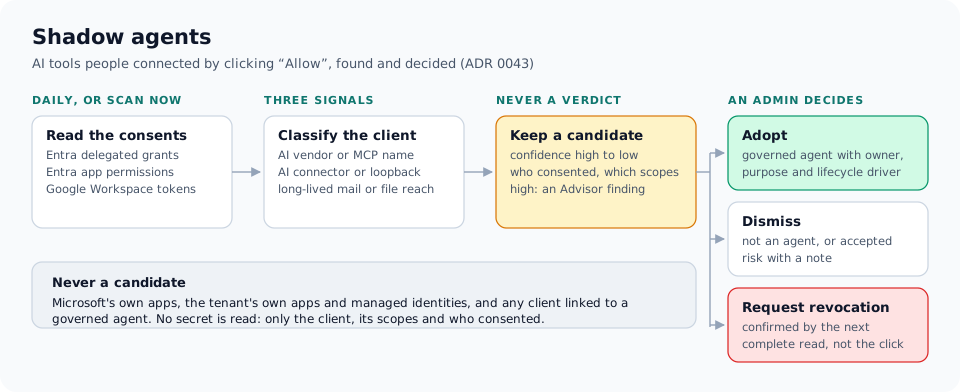
The identity provider already records every one of them. RapidValue reads those records, keeps the clients that look like AI agents as candidates, and puts each candidate in front of an administrator to decide. A match is never treated as a verdict.
What is read
| Source | What RapidValue reads | Permission it needs |
|---|---|---|
| Microsoft Entra ID, delegated | Each consent a user or an admin gave a client app (oauth2PermissionGrants), joined with the client's service principal |
DelegatedPermissionGrant.Read.All |
| Microsoft Entra ID, application permissions | Microsoft Graph app roles an admin granted to a third-party app, which then reads the whole tenant with no user at all | Application.Read.All (already in the read tier) |
| Google Workspace | The tokens each user granted to third-party apps (users.tokens) |
admin.directory.user.security (optional in the setup guide) |
Only the client, its scopes and who consented are read. No secret is read, and none is stored. A system that was set up before this scan existed may not have the permission yet; it is skipped with a reason that names what to grant, not with an error on every daily run.
Some clients are never candidates: Microsoft's own first-party apps, the tenant's own applications and managed identities (those are governed as workload identities), and any client that is already linked to a governed agent. Linking happens when an agent's external reference equals the client id.
How a client is classified
Three signals decide whether a client looks like an AI agent or an MCP client:
- Who it is. A known AI vendor or MCP client in its name or publisher.
- How it connects. A redirect URI shaped like an AI connector callback, an MCP client scheme, or a loopback callback of the kind home-built MCP clients use.
- What it reaches. A long-lived consent that reaches mail or files, or an application permission that does.
The list of names and shapes is data, kept short and specific. The signals add up to a confidence (high, medium or low). Low-confidence candidates, where only the reach matched, are kept and shown so you can filter them, and the list sorts the high ones first.
When it runs
A daily scan per tenant reads every active Entra and Google Workspace system. An administrator can also press Scan now on the Shadow agents tab. That queues a request that the scheduler picks up on its next pass, the same way "Sync now" works, so no scan runs inside a web request. There is one open scan per tenant at a time and a 15-minute cooldown between requests. The tab shows, per system, when it was last scanned, how, and with what result. A request that the scheduler has not picked up within 30 minutes says so.
What an administrator decides
The candidates are on the Shadow agents tab of the NHI page. Each candidate names the client, the system, the people who consented and the scopes they granted. An admin consent and an application permission are shown as "Application (tenant-wide)" and are not counted as a number of users.
| Decision | Who | What it does |
|---|---|---|
| Adopt | Administrator | Runs the normal agent intake: an owner, a purpose and a lifecycle driver are required. The new governed agent is linked to the client, so the client is no longer a shadow agent. |
| Dismiss | NHI write | Records "not an agent", or "accepted risk" with a required note. |
| Request revocation | NHI write or the NHI kill switch | Records the decision. On a system where revocation at the source is switched on, it also queues the removal of the consents (see below); otherwise it shows the steps to remove the consent in the identity provider's console. |
| Reopen | NHI write | Puts a decided candidate back to open. |
Every decision is written to the audit log in the same transaction. Two administrators deciding the same candidate at once cannot both win: the second one gets a conflict.
Revoking at the source
An administrator can let RapidValue remove the consents itself, per system: on an Entra or Google Workspace system, under Systems, Governance, Provisioning. It is off by default, so no existing system starts deleting consents the day it ships. With it on, a revocation request queues the removal and the scheduler carries it out on its next pass: on Entra it deletes the client's delegated consent grants, on Google Workspace each user's token for the app. The removal is a write like any other and passes the same checks: the tenant freeze, the system's Freeze or Hold, the system's revoke permission and the rate limit. A request that does not pass is recorded as not executed, with the reason.
Each consent gets its own outcome (revoked at the source, already gone, not permitted
or failed), and the candidate shows what was sent and lets an administrator try again.
On Entra the removal needs DelegatedPermissionGrant.ReadWrite.All, on Google
Workspace the security scope of the setup guide. An application permission an admin
granted is not removed this way, and a system run by a tier-3 agent is refused rather
than proxied: the agent has no removal task, and a connector credential never travels
to it.
The source confirms a revocation, not the click
Neither the request nor a successful removal call marks the candidate revoked. It becomes revoked only when a complete read no longer sees any consent to that client. If the consent comes back later, the candidate reopens. An incomplete read, such as a scan that hit its cap or a client lookup that failed, confirms nothing and marks nothing inactive.
Findings
A new high-confidence candidate raises one Advisor finding for the security team. It is critical when an administrator consented for everyone, or granted an application permission, to mail or files, and a warning otherwise. A later scan updates the same finding instead of raising a new one, and a finding someone dismissed stays dismissed. Once the candidate is adopted, dismissed or revoked, the finding closes. The finding itself changes nothing: the decision needs an owner, a reason or a note, and it is taken on the tab.
Who can see it
The candidates name people and what those people let an app read, across the tenant. Reading them needs NHI read and an oversight role. Anyone else gets a refusal rather than an empty list, and the tab is not shown to them.
Known edges, published rather than discovered
- Okta is not read. There is no Okta connector yet.
- Revocation at the source is opt-in and partial. Without the switch, the consent is removed in the identity provider's console. With it, application permissions and systems run by a tier-3 agent still need the console.
- A system run by a tier-3 agent is read on the agent, where its credential is; only what the read saw crosses the wire. The scan does not wait for the agent: it shows as waiting on the on-premises agent and the scheduler finishes it on a later pass. An agent older than version 0.2.47 is skipped as too old, and a system in tunnel mode is skipped with the advice to use agent mode.
- Google's user walk has a cap (5,000 users by default, set on the Connection tab). A scan that reaches it is incomplete and confirms no revocation.
- Classification is a heuristic. A candidate is a prompt for a decision, never a conclusion about the app.
Further reading: