Employments and multi-affiliation
A person can have several relationships with the organisation at the same time: two part-time contracts, a main contract plus a secondment, a contractor who also sits on a board, an alumna who is rehired. Each relationship is its own employment row, with its own start and end, its own org contexts and its own manager. Access is the union of what the rows in force grant, and every derived grant remembers the row it came through, so one relationship can end without taking the others' access with it.
This page explains the idea with one worked example. The rules in full are in JML flows.
One person, three rows
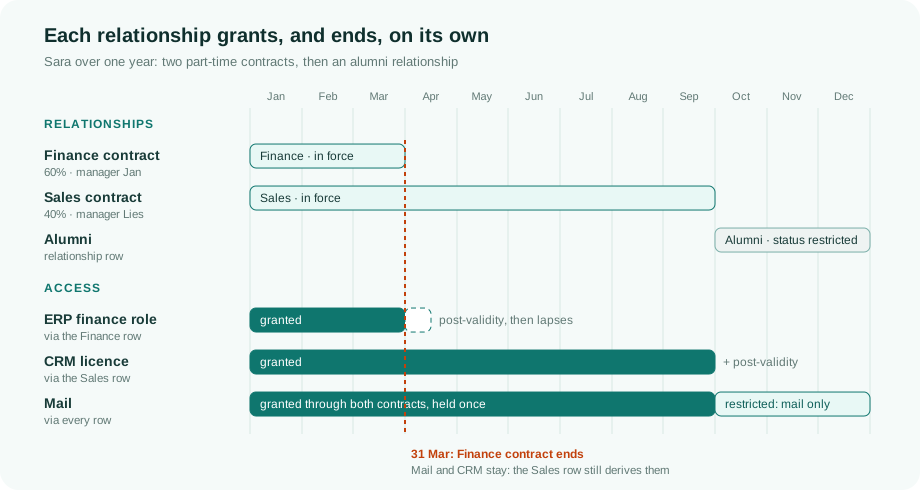
Sara works 60% in Finance under Jan and 40% in Sales under Lies. HR delivers two rows. Three policies match her:
| Policy | Matches on | Grants | Comes through |
|---|---|---|---|
| All employees | identity type | both rows | |
| Finance staff | department Finance | ERP finance role | the Finance row |
| Sales staff | department Sales | CRM licence | the Sales row |
- Both contracts in force. Sara holds all three. Mail is held once, with two reasons.
- The Finance contract ends on 31 March. Only what that row derived lapses: the ERP role stays for the tenant's post-validity for an ended context, then goes. Mail stays, now attributed to the Sales row alone. Nothing is revoked and granted again.
- The Sales contract ends and an alumni row starts. The alumni row keeps her
identity valid, so this is not a leaver. What she keeps depends on the status
the tenant maps alumni to:
activekeeps whatever policies still match, whilerestrictedkeeps only a profile such as mail.
What each row carries
- Its own window. A row without dates is permanent. The person's own lifecycle window is, by default, the earliest start to the latest end of their rows (see The lifecycle window).
- Its own org contexts. Policies are evaluated per row: every context condition of a policy must hold on the same row. A department from one contract and a legal entity from another do not combine.
- Its own manager and FTE share.
- Its own status. A contract can be on leave while the other one is active. The leave holds only what came through that contract.
- A relationship type: employment, contractor, alumni, board member, volunteer, and whatever else the tenant adds. A policy can match on it, but nothing filters on it silently.
Managers when there are several
A person is in the team of every manager they relate to: the manager of each row in force, the lead of a project membership, and an identity-level manager if one is set. Each manager sees the whole person, and the roster says through which route the person is in the team.
Deciding is narrower than seeing. When an approval or a review asks for "the manager", it resolves in this order:
- the identity-level manager, if set;
- the manager of the row or context the access belongs to;
- the manager of the main employment.
So Jan decides on the ERP role and Lies on the CRM licence. A step can also ask for all managers or any one of them. See Which manager decides.
The main employment is only a default
One row is the main employment: the one an administrator pinned, else the one HR flags, else the highest FTE share, else the longest-running. It is used for display and as the last fallback for "the manager". The person's single-value fields (department, function, company, location, cost centre and manager) are derived from it, so reports and connectors that expect one value keep working. A change of main employment is a mover event.
Where you see it
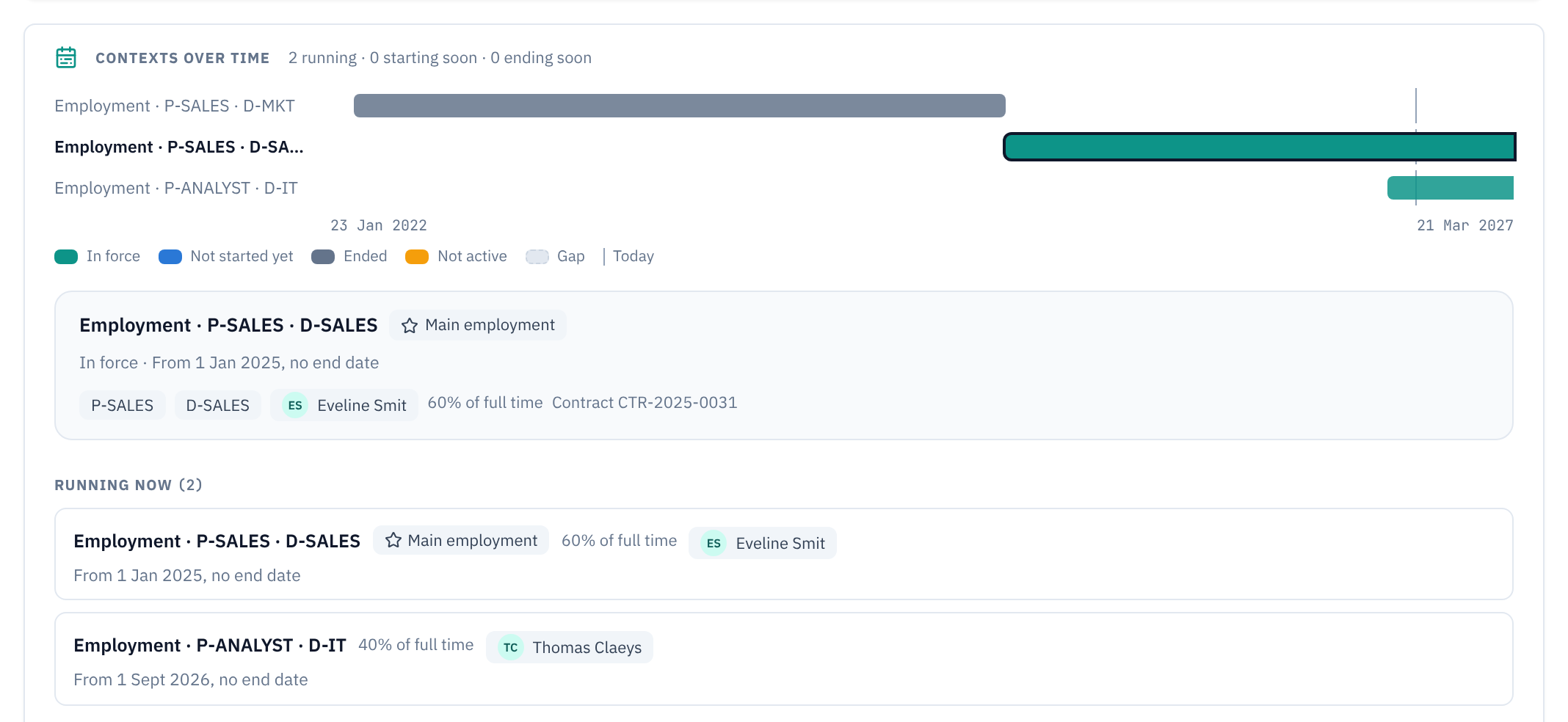
The Contexts over time card on an identity's Profile tab draws the rows and dated memberships as a timeline: each row as a bar, the gaps between them, the manager of each, and per link which entitlements start and end with it, including what pre- and post-validity add.
Related
- JML flows: employment rows, the lifecycle window and the six statuses in full.
- The data model: where employment rows sit among contexts, policies and grants.
- Approver chains: how approval steps are built.