The data model
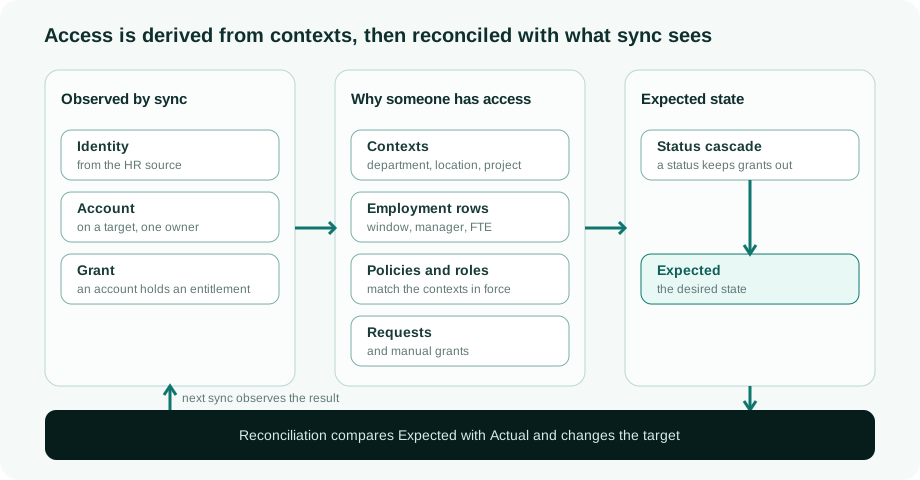
The model has three layers. Sync observes what exists on the connected systems. A second layer records why someone should have access: the contexts they belong to, the policies and roles that match them, and the requests that were approved. From those reasons the platform computes the Expected state, and reconciliation brings the Actual state on each system in line with it.
The building blocks
| Building block | What it is |
|---|---|
| Identity | A person, or a non-human identity such as a service account or an AI agent. Every identity has an identity type, a fixed internal id and a readable business id that may change. |
| System | A connected directory, application or database. A system first declares its role: a source that identities come from (usually HR), a target that holds accounts and entitlements, or bidirectional, both at once. A pure source never holds accounts. |
| Account | A login on one target system, linked to the identity that owns it by correlation and classified by purpose (personal, administrative, service, break-glass, guest and so on). One identity can have several accounts on the same system. See One person, many accounts. |
| Entitlement | A right that exists on a system: a group, a directory role, an application role. |
| Grant | One account holding one entitlement. An identity never holds an entitlement directly: access is always identity → account → entitlement. |
| Context | Anything an identity belongs to for a period: a department, a legal entity, a location, a cost centre, a function, a project. Each membership has its own validity window. |
| Employment row | One relationship between a person and the organisation, as one source record states it: a contract, a secondment, an alumni or board relationship. It groups the contexts that record supplied and carries its own window and manager. See Employments and multi-affiliation. |
| Policy and role | An access grant policy matches identities on their contexts and attributes and adds access to Expected for as long as it matches. A role is a named bundle of entitlements. |
| Request and manual grant | Access someone asked for and an approver granted, or an administrator assigned, each with its own validity. |
How Expected is computed
The computation always runs in the same order.
- The sources say what they grant. Policies over the contexts in force, roles, approved requests and manual grants, each with its validity and its provenance. Every derived grant remembers the context and employment row it came through.
- The status overrules. A status on the chain (the entitlement, the account, the system, the context the grant came through, the identity, the tenant) can keep a grant out of Expected. It never deletes the source: when the status ends, the same sources grant again. See The status cascade.
- The result is Expected. Reconciliation compares each system's Actual state with it and acts on the difference. See Reconciliation.
A grant or an account exists because at least one reason exists, and one valid reason is enough. When a context ends, only what that context derived lapses; access another context still derives stays.
Business data comes from sync, never from seeding
Identities, accounts, entitlements, grants and context memberships always come from a connected system. Configuration, schema and history may be created in the platform; business facts may not. That keeps every fact traceable to the source that asserted it (see Data authority and provenance).
Every row also carries its tenant, and the database refuses to return another tenant's rows. See Tenant isolation.
Extending the model: object types and attributes
The built-in types (identity, account, entitlement and the org contexts) and the types a tenant adds are the same kind of thing: an object type with attributes, whose instances are records. An administrator manages them under Data model → Object types, without code. A tenant can:
- add attributes to any object type, including the built-in ones (a badge number on an identity, a cost-centre code on an account);
- add object types of its own, such as Project, Customer or Mailbox request, with their own attributes and records.
What you configure per object type
| Setting | What it does |
|---|---|
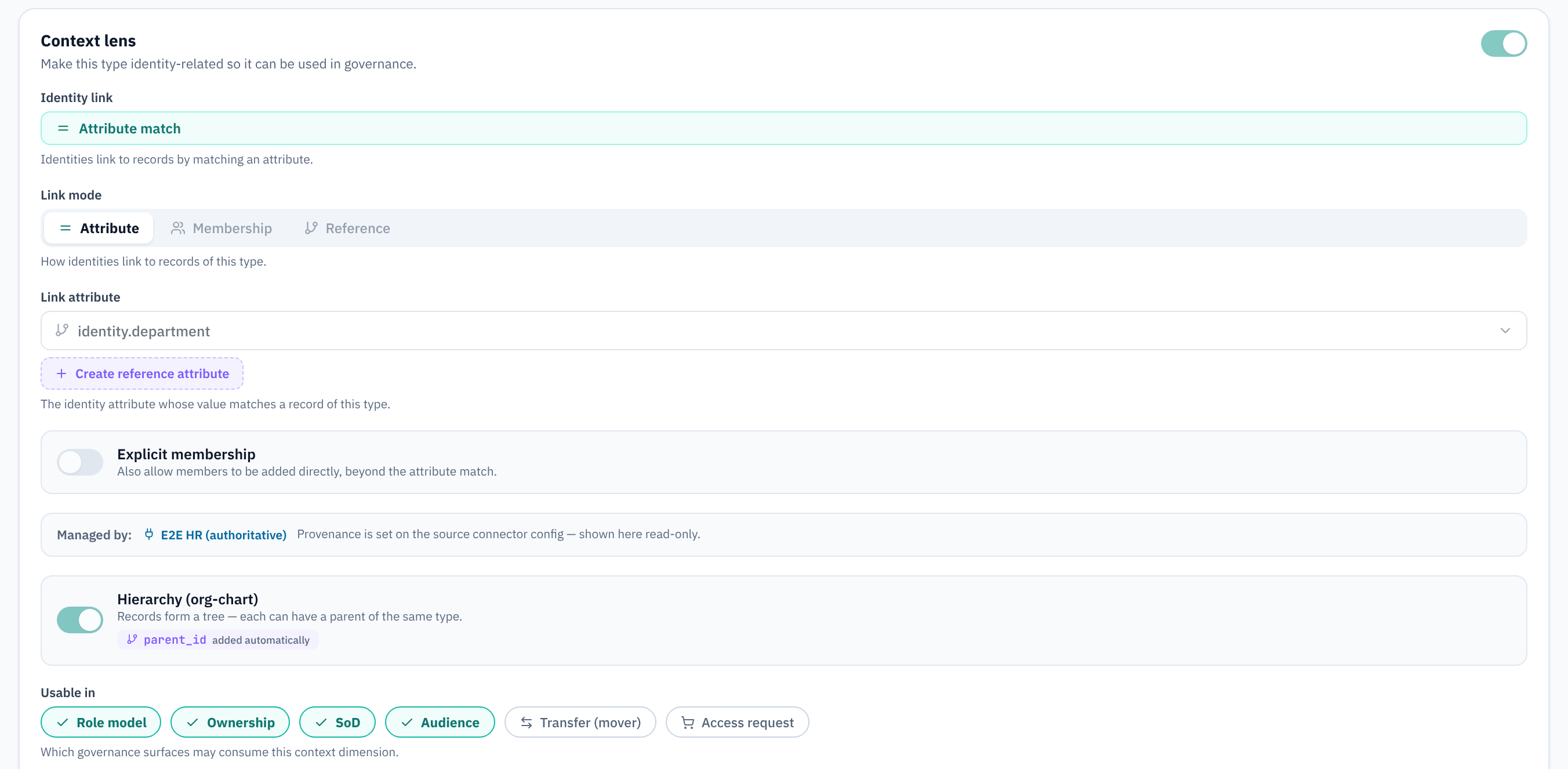
| Aspect: Context | Makes the type something identities belong to. Its records become usable in policies and roles, ownership, separation of duties, audiences, mover transfers and context-bound requests, each switched on separately. You also set how identities link to a record (through an attribute, an explicit membership or a reference), whether a source or the platform manages the records, and whether records form a hierarchy such as an org chart. |
| Aspect: Ownable | Records can have owners and take part in the ownership cascade. |
| Aspect: Validity | Records carry a start and an end, read from two attributes. A record whose window has passed counts as ended, which a lifecycle coupling rule can act on. |
| Aspect: Process | A form creates a record and starts a provisioning action. See Record processes. |
| Source ranking | For identities only: the ordered list of sources that decides which source owns a person when two of them supply the same one. See Which source owns a person. Other object types have no ranking; each record belongs to the connector that imported it. |
| Uniqueness | Combinations of attributes that must be unique within the tenant. |
| Status map | How the type's own status values read as one of the six behaviour statuses (see JML flows). A value with no mapping reads as active and raises a finding. |
What you configure per attribute
| Setting | What it does |
|---|---|
| Data type | Text, number, date, date and time, e-mail, URL, a list of values, a reference to another object type (single or multiple, with a back-reference), or JSON. |
| Data authority | Declares where the value comes from. Authoritative: a connector's mapping supplies it. Computed: a generation rule derives it, for example an e-mail address from first and last name. Manual: people maintain it. An identity attribute can use a different mode per identity type. By default these are declarations. For identity attributes a tenant can switch on enforcement in the governance settings: sync then lets only the declared source write each attribute, and a manual edit of a field a source owns is refused. Other object types are not enforced; see Data authority and provenance. |
| Sensitivity | Public, internal, sensitive or personal data. It sets the default field visibility per role. |
| Applies to | For identity attributes: which identity types have it, so a service account does not show a manager field. |
| Form and search | Required or not, a default value, hidden from forms, included in list search. |
| Renaming | A renamed attribute keeps reading data stored under its old key. |
Related
- Data authority and provenance: which source may set which attribute, and what happens when sources disagree.
- Reconciliation: how Expected and Actual are compared.
- Glossary: the precise meaning of each term on this page.